Siemens Dishwasher Card using Custom Card Features
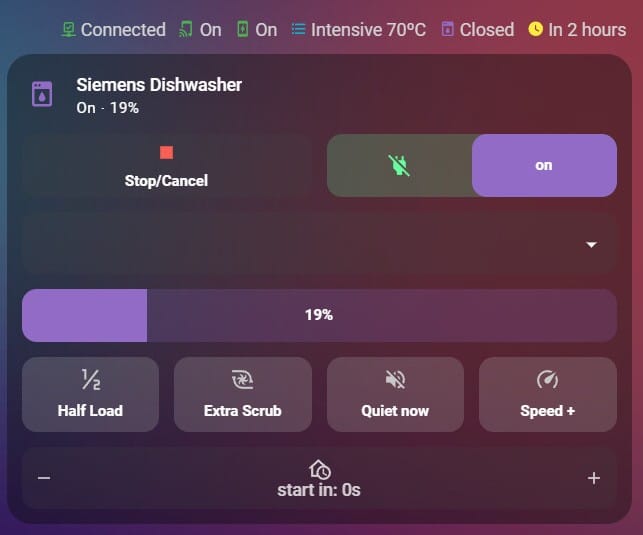
Let's be honest: if you’ve tried to add your Siemens Home Connect dishwasher to your Home Assistant dashboard, you’ve probably noticed that there are simply no pretty cards out there for this.
Siemens dishwashers actually give us a ton of great data, but in a standard setup, those controls are not very intuitive. You often have to click through three different menus just to start a simple wash! Most of the default options are either a wall of text or a clunky set of entities that stick out like a sore thumb against a clean, modern UI.
If you’re a fan of the Mushroom aesthetic, you know the struggle of trying to keep that minimalist, rounded look while keeping functionality unaffected. I finally managed to bridge that gap with the use of custom-card-features. It’s exactly what I needed to create a high-functioning Dishwasher control card and a status card that both look like they belong on a premium dashboard.
So here are the features:
- Quick Stop/Cancel: A big, clear button to stop the machine if you forgot a spoon!
- Easy Option Toggles: Simple switches for Half Load or Extra Dry—no more digging through settings.
- Program Selectors: A handy dropdown to pick between Eco, Auto, or Speed modes in a split second.
- Status Badges: Little icons at the top that show if the machine is online and—most importantly—if you remembered to enable Remote Start on the dishwasher itself.
- Delay Start (+/- ): Instead of a clunky slider, I used a plus/minus toggle. This lets you precisely click through the hours to delay your start time
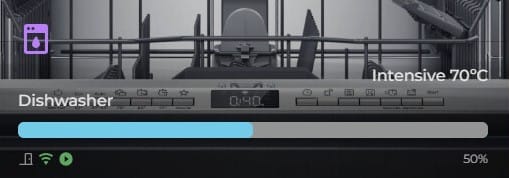
- Visual Progress Bar: A clean bar that fills up as the dishes get cleaner, so you know exactly how much time is left at a glance.
The files:
Also read on:
 g0b3x98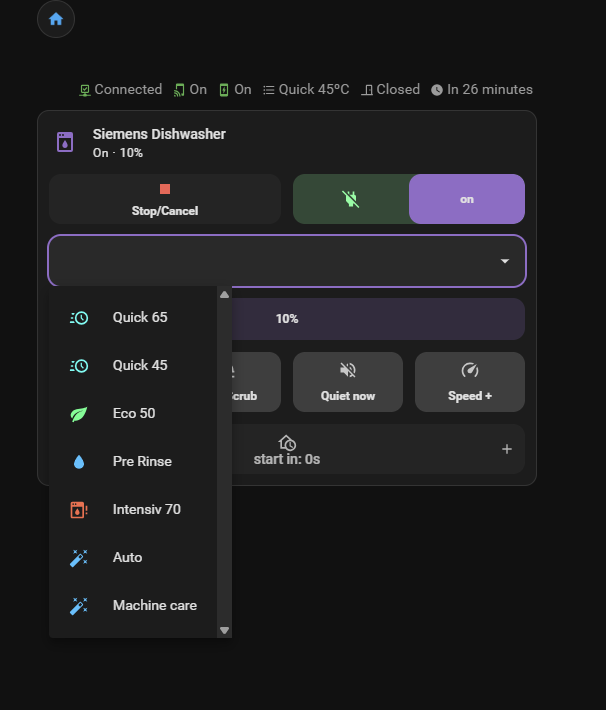
 Nerwyn